
MediaMonkey Pro
Ventis Media, Inc.Music & Audio
4.51.33K Reviews
- Version
- Varies With Device
- Installs
- 100.00K
- Age Rating
- Everyone
Screenshots
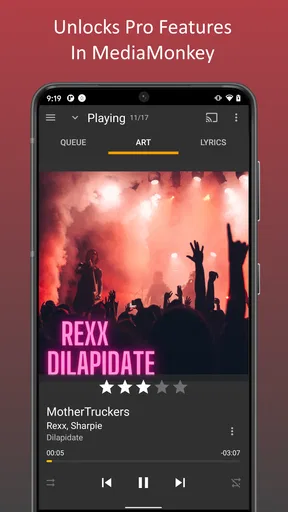
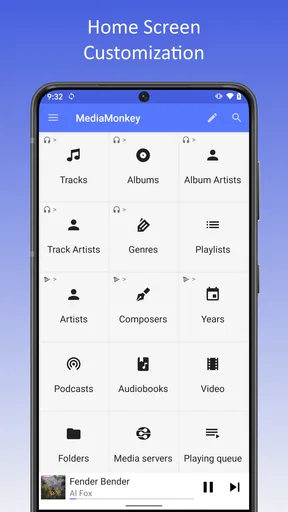
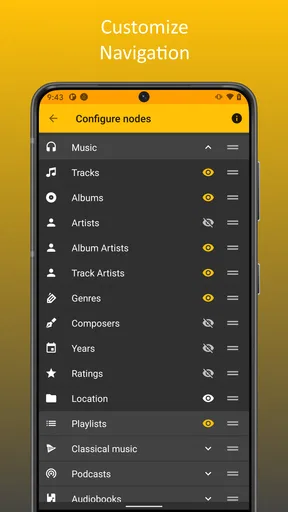
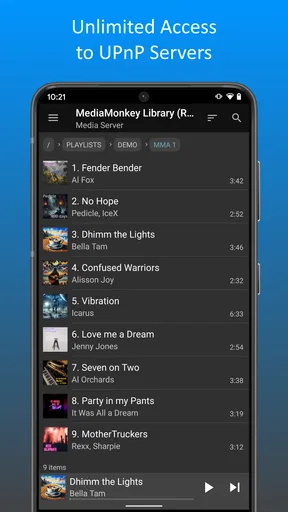
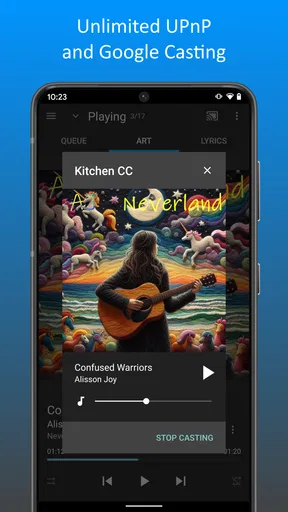
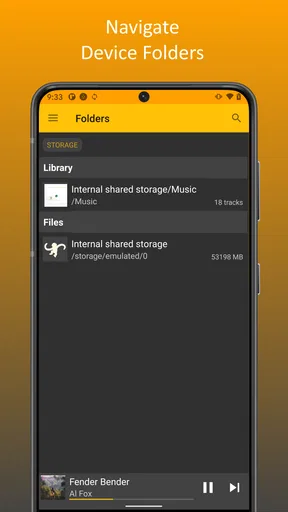
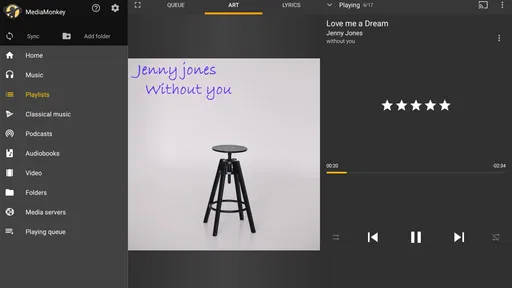
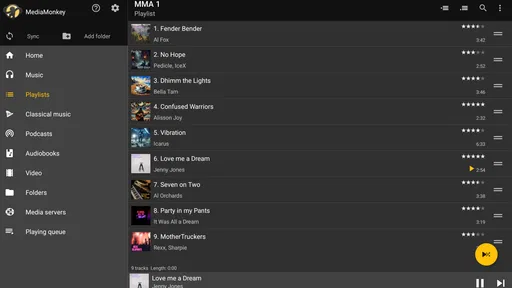
Our Review of MediaMonkey Pro
 Analysis by Appyee
Before paying for any music app, I like to separate what the purchase actually promises from what I hope it will do. MediaMonkey Pro is a paid Music & Audio app from Ventis Media, Inc., priced at $5.49. Its role is to unlock the Pro features of MediaMonkey, so the practical question is whether you already use that music library and need the extra capabilities—not whether you need another general-purpose streaming service.
What the purchase is for
The app has been available since January 6, 2014, and has an Everyone age rating. It has a 4.5 average from around 7,000 ratings, with about 1,300 written reviews and over 100,000 installs. Those figures suggest an established audience, but I would treat them as context rather than proof that the Pro upgrade fits every listening habit.
One important distinction is that this is an unlock for MediaMonkey, not a promise of a new music catalog. If your listening mostly happens through a streaming subscription and you rarely handle local audio files, paying for a library-management upgrade may not change much about your routine. If you already depend on MediaMonkey to keep a personal collection in order, the purchase has a clearer purpose: it gives you access to its Pro features.
Where the value can show up
I see the strongest case for paying when the music itself is already yours to manage. A collection gathered over years can contain inconsistent artist names, incomplete album details, duplicate-looking entries, and tracks scattered across folders. Tools for organizing and controlling that library can save repeated small frustrations, especially when you listen to albums rather than relying on one generated mix.
The useful question is not simply how many features an upgrade unlocks, but how often you will use them. A person who plays a handful of familiar tracks may be fine with a simpler player. Someone who regularly searches a large collection, adjusts its organization, or moves between devices has more chances to benefit. At $5.49, I would consider the purchase in light of that recurring use rather than treating the price alone as a guarantee of value.
It also helps to be comfortable with the idea of managing a library. MediaMonkey’s appeal is tied to taking an active role in your music: keeping information tidy, choosing how tracks are grouped, and deciding what belongs in a playlist. That can feel satisfying if control matters to you, but it is extra effort if you would rather press play and let a streaming service handle discovery and organization.
Trade-offs to consider
The biggest trade-off is focus. A dedicated collection manager can be more useful than a basic player for people with substantial local libraries, but it is not automatically the best fit for listeners who want new releases, recommendations, or a ready-made catalog. I would choose a streaming app for those needs and MediaMonkey for a different job: working with music files I already have.
There is also a practical buying question: an unlock is most compelling when the base MediaMonkey experience is already part of your routine. If you are only curious, first make sure the underlying app suits the way you browse and play music. Paying for Pro makes less sense if you dislike the basic workflow or have no collection-management problem to solve.
Who I would recommend it to
I would look at MediaMonkey Pro if you keep a personal library, care about how it is organized, and expect to use the extra capabilities regularly. It is less persuasive for someone whose whole music life is built around streaming playlists, or for anyone who wants a very simple player with minimal setup. The app is rated for Everyone, but that does not mean its library-focused approach will suit every age or listening style equally well.
My buying test is straightforward: identify one recurring task that the Pro unlock would improve, then ask whether you do that task often enough to justify the $5.49 purchase. If you cannot name one, wait. If you can, the upgrade has a practical reason to earn its place on your phone.
Getting Started with MediaMonkey Pro
First things first, downloading MediaMonkey Pro is a breeze. Available for both Android and iOS, it’s just a tap away on your respective app store. The installation is quick, and before you know it, you're diving into a world of music management that feels almost like magic.
Once you open the app, you’re greeted with a clean and intuitive interface. No clutter here, folks! The main screen displays your library, and it's neatly categorized into artists, albums, genres, and more. It’s like having your own personal DJ ready to curate your playlists.
Features That Make it Shine
One of the standout features is the ability to sync your music across multiple devices. Whether you’re on your phone, tablet, or computer, MediaMonkey Pro ensures your music is where you want it, when you want it. The synchronization process is seamless and, dare I say, a game-changer for those who love their music on the go.
Another feature that had me hooked is the tag editor. You can edit metadata for your tracks, ensuring everything is perfectly organized. No more "unknown artist" labels on your favorite songs. Plus, the app automatically retrieves album art, giving your library a polished look.
- Advanced search: Finding a track in a large library can be daunting, but not with MediaMonkey Pro. The advanced search options let you locate your music files with precision.
- Equalizer and playback options: Tailor your listening experience with a built-in equalizer and various playback options. Whether you’re a bass head or prefer a crisp treble, this app has got you covered.
- Sleep timer: Love falling asleep to music? The sleep timer ensures your tunes shut off after a set period, perfect for those late-night listening sessions.
What Makes It Stand Out
Now, I know there are a ton of music management apps out there, but MediaMonkey Pro feels special. It’s like the Swiss Army knife of music apps. The level of control it offers over your library is unparalleled. Whether you’re a casual listener or an audiophile, there’s something here for everyone.
The playlist management is another area where this app truly excels. You can create, edit, and manage playlists with ease. Plus, it supports a plethora of audio formats, so you’re not limited to the usual MP3s.
My Personal Take
I’ve been using MediaMonkey Pro for a few weeks now, and honestly, I’m impressed. The app has become an integral part of my daily life. The ability to effortlessly manage and enjoy my music collection has been nothing short of delightful. It’s like having a personal assistant for my music.
A small tip: make sure to dive into the settings and explore all the customization options. You can tweak the app to fit your exact needs, making the experience even more personalized.
A realistic use for this kind of setup is a commute where mobile data is inconvenient or where I simply want to listen to albums I already keep in my collection. I would sort out the library at home, make a playlist for the trip, and use the phone as the listening device rather than trying to manage every detail on the move. That workflow puts the organizational work where it is easier and leaves the commute for listening.
Small habits that make a library easier to live with
For a large collection, I would fix the most disruptive metadata problems first instead of trying to perfect every track at once. Correcting an artist name or album grouping that breaks browsing can have more day-to-day value than polishing obscure details on music I rarely play. Search is useful as a fallback, but consistent tags make browsing by artist or album feel far less dependent on remembering exact track titles.
Playlists can also serve as practical shortcuts rather than elaborate projects. I would make a few based on real situations—such as a short walk, focused work, or winding down—then update them when a track stops fitting. That is more sustainable than building a huge collection of lists I never revisit. The trade-off is that this approach rewards a little ongoing attention; people who do not want to curate anything may prefer an automatically generated mix elsewhere.
When testing synchronization, I would start with a small selection and confirm that the devices show the music I expect before relying on it for a trip. Sync is valuable precisely because it can reduce repeated manual work, but a quick check helps catch a mismatch before I leave home. I would also keep the library organization consistent at its source, so a device-to-device workflow does not become a way of carrying conflicting versions of the same collection.
How it compares with simpler players
Compared with a lightweight audio player, MediaMonkey’s library-first approach makes more sense when I care about browsing, tags, playlists, and keeping a collection usable over time. A simpler player is often the better choice if I only need to open a folder and play an album. It asks less of me and may be easier to learn, while MediaMonkey is more appealing when there is enough music to make organization matter.
Compared with streaming apps, the difference is even more basic: I think of MediaMonkey as a way to manage and enjoy music in a personal library, not as a substitute for discovery through a large subscription catalog. If finding unfamiliar artists and getting recommendations is the main reason I listen, I would keep using a streaming service. If I want careful control over files and playlists I have collected, the library tools are the more relevant part of the equation.
Where I would be cautious
There is a learning curve in any app that offers several ways to organize a collection. Even a tidy interface can leave new users deciding whether to browse by artist, album, genre, or playlist, and the most helpful arrangement depends on how their music is tagged. I would not expect a purchase to instantly solve a disorganized collection; the app can provide tools, but the result still depends on the quality of the library and the time I am willing to spend maintaining it.
I would also avoid buying solely because the word “Pro” sounds like an essential upgrade. The sensible order is to decide whether MediaMonkey itself matches the way I listen, then consider whether its paid features address a repeated need. That distinction matters for someone moving from streaming, since changing services and organizing a local collection are different projects, not interchangeable upgrades.
My everyday recommendation
If a friend told me they had a well-used personal music collection and were tired of losing time to messy tags or awkward browsing, I would suggest taking a close look at MediaMonkey and deciding whether the Pro unlock fits their routine. I would describe it as a focused tool for people who want to take charge of their music library, rather than a universal answer for every kind of listener.
If that sounds like you, the combination of library organization, playback controls, and playlist management gives the purchase a clear purpose. If you mostly stream, seldom revisit local files, or prefer not to maintain a collection, I would skip it for now and choose a player or service designed around that simpler habit. The best reason to pay is not the feature list on its own; it is having a regular listening task that those features make easier.
If you’re serious about your music and tired of the chaos in your library, give MediaMonkey Pro a shot. Trust me, you won’t be disappointed.
In conclusion, MediaMonkey Pro isn’t just another music app; it’s a comprehensive tool that transforms how you interact with your music library. From managing metadata to syncing your collection, it covers all the bases. So go ahead, download it, and let the music flow seamlessly into your life.
Verdict
Strengths of MediaMonkey Pro
- Comprehensive media organization tools.
- Supports a wide range of audio formats.
- Syncs seamlessly with multiple devices.
- Highly customizable user interface.
- Advanced playlist management features.
Limitations of MediaMonkey Pro
- User interface may feel overwhelming.
- Paid version required for full features.
- Occasional syncing issues reported.
- Resource-heavy on older devices.
- Limited video format support.
Similar Picks in This Category
View All
YouTube Music
Google LLC4.4

Samsung Music
Samsung Electronics Co., Ltd.3.8

Spotify: Music and Podcasts
Spotify AB4.3

JioSaavn - Music & Podcasts
Saavn Media Limited4.3

Lark Player:Music Player & MP3
Lark Player Studio - Music, MP3 & Video Player4.6

StarMaker: Sing Karaoke Songs
SKYWORK AI PTE. LTD.4.3
Frequently Asked Questions
What features does MediaMonkey Pro offer compared to the free version?
MediaMonkey Pro enhances the free version with advanced features like wireless syncing, automatic library organization, and high-quality audio playback support. It also offers customized playlists, advanced search capabilities, and no ads. With these enhancements, users can experience a seamless and more personalized music management experience.
Is MediaMonkey Pro compatible with both Android and iOS devices?
Yes, MediaMonkey Pro is available on both Android and iOS platforms. This cross-compatibility ensures users can enjoy a consistent music management experience across different devices, syncing their libraries effortlessly. However, some features might vary slightly between platforms, so checking specific device requirements is recommended.
How does MediaMonkey Pro handle music file formats and quality?
MediaMonkey Pro supports a wide range of music file formats, including MP3, AAC, FLAC, and more. It ensures high-quality playback with superior audio fidelity. Users can enjoy their music in the best possible quality, with options for volume leveling and audio effects for enhanced listening experiences.
Can MediaMonkey Pro sync my music library across devices?
Yes, MediaMonkey Pro offers robust syncing capabilities across devices. Users can wirelessly sync their music library between their computer and mobile devices, ensuring the latest updates and playlists are available everywhere. This feature is particularly useful for users who frequently update their music collections.
Is there customer support available for MediaMonkey Pro users?
MediaMonkey Pro provides customer support through various channels, including an online help center, user forums, and direct contact options. Users can access tutorials, troubleshooting guides, and community advice. Premium support might be available for Pro users, ensuring any issues are promptly addressed.
